
You can find locator.exe (for Windows) in your Downloads folder.
.
1) Install Locator (double click the file name).
2) After installation, open Locator and start "Creating Account" by entering your email address.
3) Upon registration success, configure your PC and cloud file locations (OneDrive / Teams / SharePoint, Dropbox, Google Drive, etc.), and start locating your files faster and more reliably.
If you get this warning...
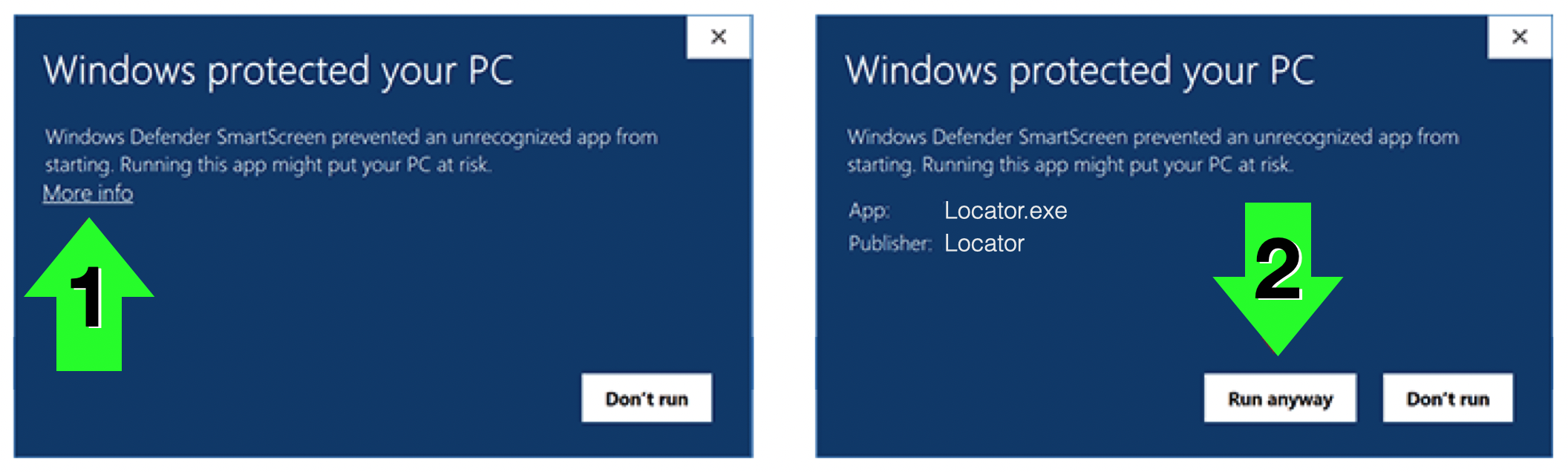
... it is common for new software to trigger it. It is safe to proceed. Click "More info" and then "Run anyway."
Please consult our friendly chatbot, Miss File, for assistance (see lower right). She'll happily provide our tech support phone number if you want to talk to us live! Just ask her for it.
.
.
.
.
.
.
.
.
.
.
.
.
.
.
.
.
.
.
.
.
.
.