
My name is Dave Nelsen, and two things position me well to address this problem.
First, as a professional speaker (on “technology”) since 2009, I’ve met more than 10,000 CEOs of mostly mid-size private companies. They’ve spent countless hours complaining about too many files in too many places. In other words, I have firsthand knowledge of a HUGE issue across countless organizations.
Second, I’ve built and sold two investor-backed ($70MM) software companies in the past, so I know how to create and market software solutions.
So my team and I built Locator — a free file finder for Windows and Mac that solves the problem at its root.
The Problem: Folders Are Slow, Unreliable, and Getting Worse
Most of us organize our files the way we were taught: folders within folders within folders. It feels logical — until you need to find something. Was that contract in the client folder or the legal folder? Did you save it to Dropbox or your desktop? Is it on your work laptop or did you share it to Teams? The mental overhead of a deep folder hierarchy is real, and the time lost navigating it adds up fast.
The deeper problem is that this approach doesn’t scale. As the volume of digital information we deal with grows — more files, more cloud services, more collaboration tools — folder-based navigation becomes exponentially less efficient. The strategy that sort of worked when you had one computer and one hard drive breaks down badly when your files are spread across your computer, Dropbox, Google Drive, OneDrive, iCloud, Teams, SharePoint, etc.
The Solution: One Search Across Every Location
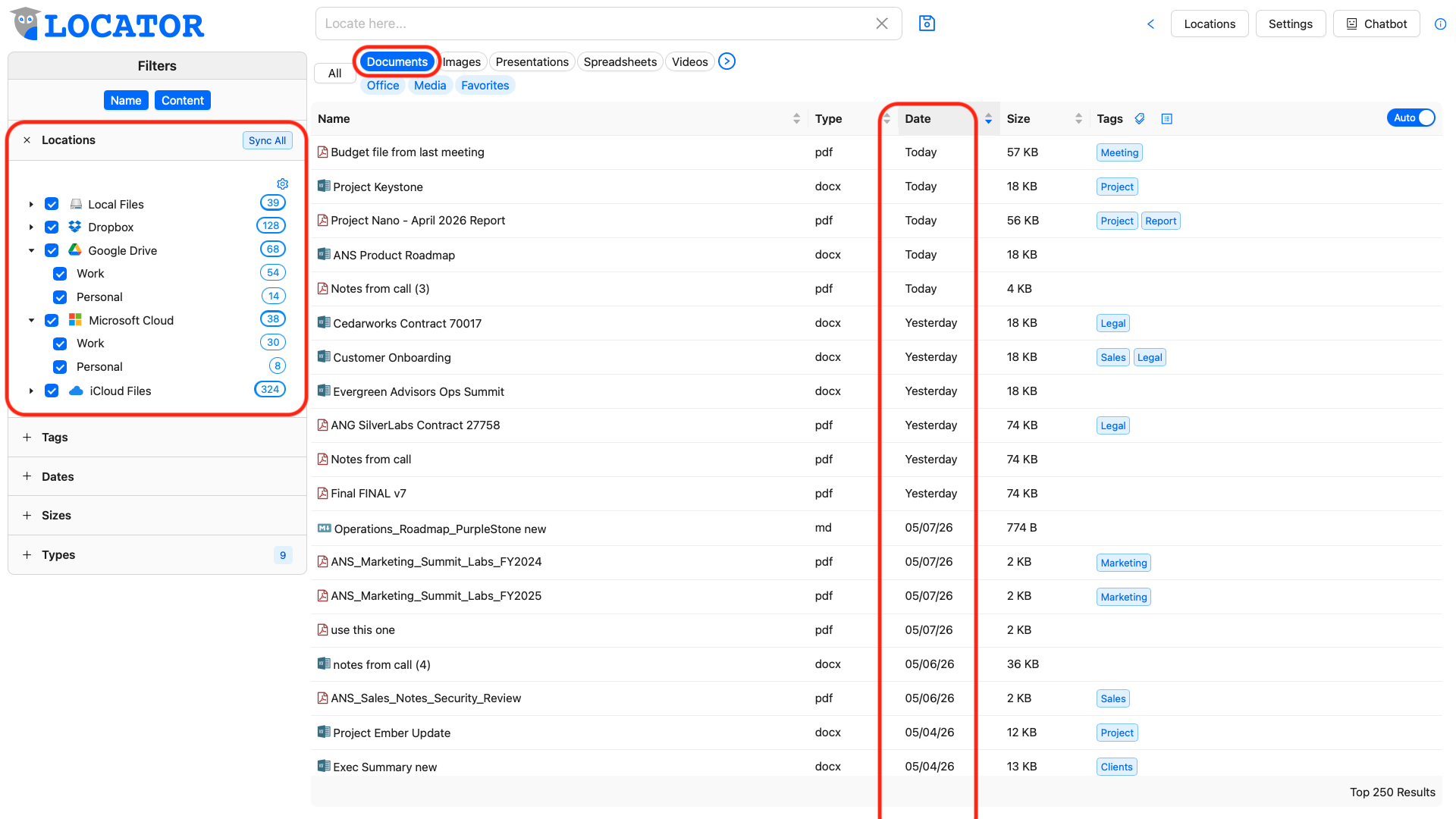
Locator runs a single fast search across your computer and all your connected cloud drives simultaneously. Most results appear in a second or two. You don’t have to remember where you saved something — Locator finds it wherever it lives.
Importantly, Locator doesn’t ask you to stop organizing your files into folders. It works alongside whatever system you already use. What it doesn’t do is inherit or display the chaos of your folder structure — it abstracts that away and just shows you files.
The Key Insight Behind SmartLists
Here’s something I noticed from all those conversations with CEOs and knowledge workers: when someone is looking for a file, they almost always know two things. First, what type of file it is — a spreadsheet, a presentation, a document, an image. Second, it’s usually a recent file. Sometimes you’re hunting for something you created three years ago; most of the time you want something from last week or last month.
Those two insights shaped one of Locator’s signature features: SmartLists. A SmartList instantly shows you your most recent files of a specific type — your newest documents, your latest spreadsheets, your most recent presentations or images — pulled from all your connected locations at once. No search required. In many cases, the file you’re looking for is sitting right there, one click away.
When you do need to search, Locator lets you filter results by name, content, date, size, file type, folder, and location — so you can narrow things down quickly without drowning in noise.
Locator is free, private by design (it never stores copies of your files), and available for both Windows and Mac. If you’re spending more time looking for files than working on them, give it a try at locatorlocator.com.